
Saturday, August 4, 2018
Unit Circle Practice


Saturday, August 26, 2017

Sunday, August 6, 2017
Domain of a Function defined by a Composition
I created this GeoGebra
 applet to help with visualization of the domain of a function defined by a composition.
Monday, June 5, 2017
Euclid's Algorithm

This tool for visualizing of Euclid's algorithm (programmed by Jason Davies) comes from Underground Mathematics. Fawn Nguyen has written a fabulous narrative on how she used it as a notice-and-wonder activity with her sixth graders. What she did would work just as well with high school students. All you need to get started are two positive whole numbers.
Thursday, January 5, 2017
Snail's Trail Quilt Square
 I created this GeoGebra applet based on a quilt square pattern to use in a precalculus class as a visual introduction to the sum of an infinite geometric series. A nice accompaniment is this applet from Irina Boyadzhiev. I also created a Desmos activity with a focus on asking questions which incorporates these two applets.
Sunday, August 21, 2016
Visualizing radians
 Sam Shah shared a GeoGebra applet created by a colleage of his which does a beautiful job of demonstrating what a radian is. He wrote about it here. I made minor modifications, mostly so that the word radian doesn't actually appear. Here's that slightly modified version.
Saturday, July 30, 2016
Exponential Models Card Sort

Saturday, July 23, 2016
Introduction to Point-Slope Form
 I created this Desmos activity to help students understand point-slope form of a linear equation, both how it relates to the equation for calculating the slope between two points and why it might be useful even if you're already good at slope-intercept form. It also introduces the idea of calling the change in x by the name h.
 Saturday, May 2, 2015
Evaluating Inverse Trig Expressions
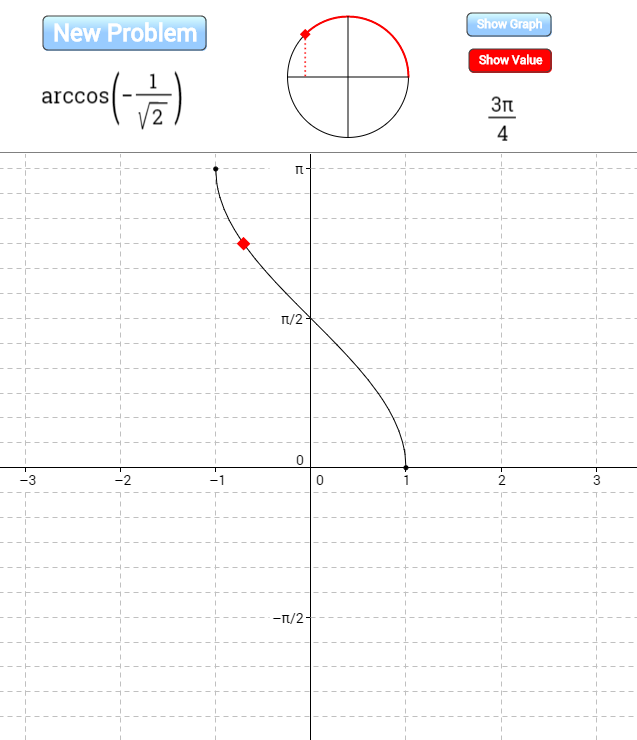 I created this applet on GeoGebraTube to help students practice evaluating inverse trig functions of special angles by visualizing both the unit circle and the graph of the inverse trig function.
Monday, March 30, 2015
Variation on John Golden's GeoGebra Ferris Wheel
 I love John Golden's GeoGebra Ferris Wheel, which he's written about here and I've written about here. I also love how GeoGebraTube makes it so easy to start with the great work of someone else and create a variation on it. Here's my variation on John's creation for a user who's slightly more experienced with transformations and with sine and cosine functions. Rather than asking the user to come up with parameters for a given function, it requires the user to come up with the whole function. I also added the option to hide the actual function so that the user could begin by thinking about what it would look like.
We had a great discussion in precalculus class today based on a single randomly generated wheel. We went wherever student questions and answers took us and ended up covering lots of ground. The particularly interesting stuff from my perspective came when those who saw the graph as a shifted sine wave were fighting it out with those who saw it as a shifted cosine wave and those who saw it as a flipped cosine wave. Finally lots of people were seeing lots of ways that they might write an equation for a sinusoidal wave. At the very end of class we generated a new wheel and everyone tried to write a function to go along with it. Class was over and people were pleading, "Please--try my equation!"
Saturday, March 28, 2015
SolveMe Mobiles
 The puzzles at SolveMe Mobiles are linear equations disguised as perfectly balanced mobiles. The early puzzles are simple while the later ones require solving systems of equations. The interface is elegant. Drag a beam to have the corresponding equation appear. Drag a shape that's on both sides of an equation to subtract it. Drag a common factor to divide by it. Substitute by dragging a shape that you've isolated on one side of an equation to somewhere else it appears. Create your own mobiles. Play without creating an account or create an account to save your progress and creations. (No email is required to create an account, though those over 13 may include an email for the purposes of password reset.)
Sunday, March 22, 2015
Rotational and Reflectional Symmetry
 I used GeoGebra to create this applet for exploring the rotational and reflectional symmetry of a variety of images.
Friday, March 20, 2015
Euclid: The Game
 Complete with a high score list, Euclid: The Game, created by Kasper Peulen using GeoGebra, presents you with a series of compass and straightedge challenges which get progressively more difficult as you move through the levels. You earn a gold medal for completing a level in the minimum number of moves. See if you can get all the way from constructing an equilateral triangle to inscribing a pentagon in a circle!
Asymptotes of Rational Functions.
 Asymptotes of Rational Functions is a GeoGebra construction designed to help people explore the relationship between the equation of a rational function and its graph. You choose the rational function you'd like to explore. Here's a story of something neat that happened when I used it in class.
Thursday, March 19, 2015
Finding Equations of Polynomial and Rational Functions
 I created this activity with Desmos. Graphs of several polynomial and rational functions are provided. The goal is to find the equation of each. It's self-checking in that when you type in the right equation your graph will match the given graph.
Wednesday, July 10, 2013
Observe and Ask
 This simple Desmos sketch is designed to elicit observations and questions that will lead naturally to an introduction of the ideas of domain and range and an exploration of power functions. I show it to a class without any explanation and as I move the a-slider I ask for questions (which I write on the board, but don't answer). If students want the k-slider moved or if they want to see a particular value of a or k, I oblige. Eventually I ask students to begin trying to answer some of the questions and see where that takes us.
Tuesday, July 9, 2013
Compass and Straightedge Construction Challenges
 Ancient Greek Geometry from Nico Disseldorp's Science vs. Magic is a simple but elegant applet which gives compass and straightedge constructions the feel of a game. You start with two points and are given a list of things to construct, along with the number of steps in which you ought to be able to complete each construction. Click on two points and you create a line segment between them. Click one point and drag and you get a circle centered at that point. You score when you complete each construction, and score more when you do it within the number of steps prescribed. The first task is Proposition 1 of Book 1 of Euclid's Elements. The applet works equally well on a tablet or a standard computer.
Friday, May 17, 2013
Intuitive Notion of the Limit - One-Sided Limits
 This applet, which is part of Marc Renault's GeoGebra Calculus Applets collection, provides an intuitive introduction to the idea of a limit of a function as x approaches c from the right, left, or both.
The red, green, and blue lines along the x-axis, y-axis and the function which shrink as you decrease δ help with the visualization of motion along the function toward the point where x = c and the corresponding motion toward the limiting values on the axes. Choose from the good library of example functions that are included or enter your own. (I like to start with my own rational function which looks linear but actually has an unseen hole to emphasize from the very beginning the difference between the value of a function and its limit at a point.)
When I used this with a class for the first time, my students asked to see the examples with "Exploding" in the title and they reacted audibly to the motion of the green lines on the y-axis as the function approached its asymptote. My experience has been that when introduced to the idea of limits on a graph there are always a few students who have a lot of difficulty visualizing the various ways in which certain things approach approach other things, and starting with this applet seemed to really help.
Tuesday, April 2, 2013
Puzzle
 Can you figure out how the p and q sliders control the lines? To check your answer, try typing in equations of the lines (in terms of p and q) in the blank rows underneath the sliders and see if the lines that your equations produce match the lines that are already there. (When you've found something that works--but not before, that's cheating!--you can scroll down to rows below the blank ones to see if your equations are the same as the ones that were actually used to produce the lines.)
Friday, March 22, 2013
Operations on functions graphically

(Links updated 7/30/2016)
Subscribe to:
Posts (Atom)